AI Exposure in Microsoft 365
Why governance must come before broad Copilot and AI agent rollout
Positioning statement: Microsoft 365 Copilot is permission-trimmed, but it changes the practical risk profile of the tenant. It turns existing oversharing, broad access, permissive links, and inconsistent labeling into fast discovery, summarization, and presentation to the user. LegaSystems helps organizations assess that exposure, reduce the retrieval surface, and implement governance controls before AI makes the problem operational.
Before You Deploy AI in Microsoft 365, Find Your Hidden Information Exposure
Assess where Copilot and AI agents can discover, summarize, and reuse business data - then reduce that exposure with practical governance controls.
Why AI implementation without governance increases risk
- Copilot does not usually bypass permissions, but it makes existing access dramatically more usable by turning searchable content into immediate answers, summaries, and extracted business context.
- Traditional risk assumptions break down because sensitive information no longer needs to be hard to find; if users can access it and enterprise search can retrieve it, AI can often synthesize it.
- Overshared SharePoint sites, permissive OneDrive links, Teams conversations, mailboxes, and connected repositories can become high-value exposure surfaces once Copilot or agents are enabled.
• Third-party AI tools, custom agents, and application permissions can widen the blast radius further if governance and permission scoping are not addressed first.
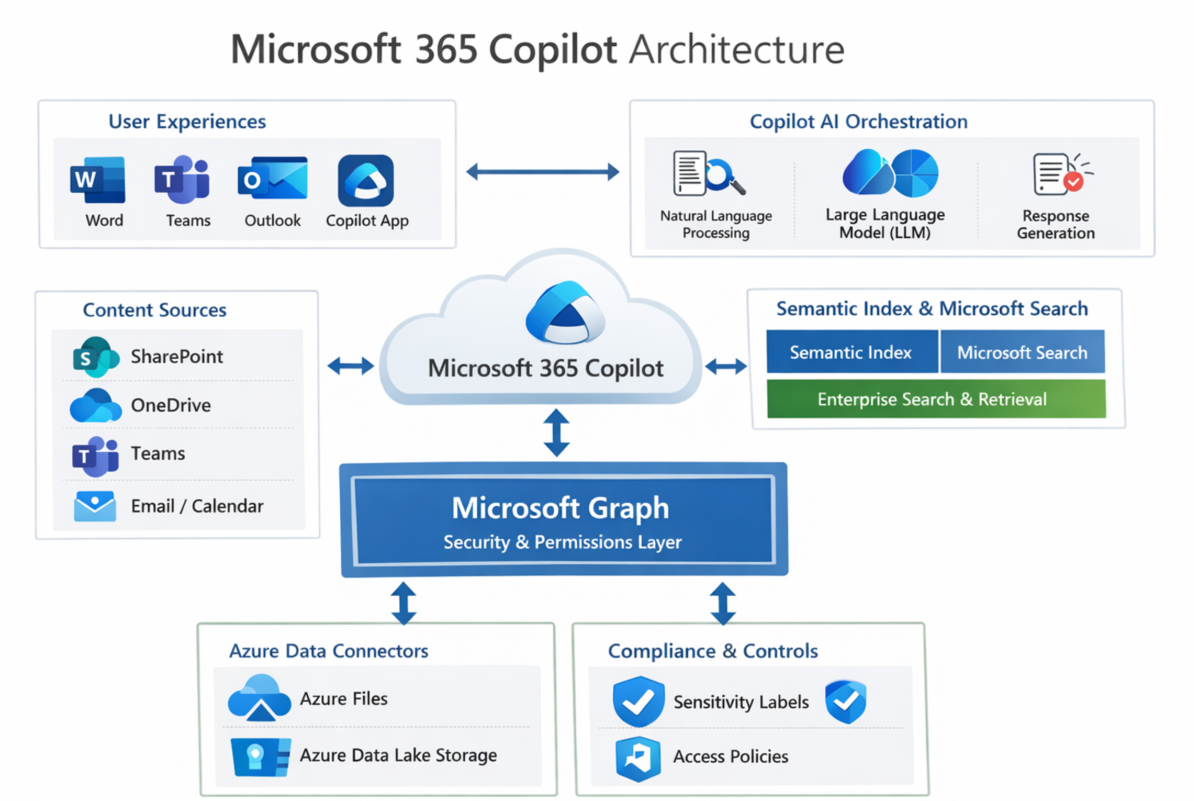
Key Microsoft 365 AI risk areas
|
Workload / Surface |
Typical Governance Gap |
Practical AI Risk |
What to Review |
|
SharePoint Online |
Broad site membership, stale permissions, inherited access, oversized groups |
AI can rapidly discover and summarize documents, pages, and lists that were previously difficult to find |
Site permissions, external sharing, inheritance, Everyone-style access, sensitive site inventory |
|
OneDrive for Business |
Anyone links, old sharing links, orphaned content, weak expiration controls |
AI can answer from the contents of broadly shared files and make personal storage risk far more visible |
Link types, external sharing posture, guest access, orphaned accounts, file classes |
|
Microsoft Teams |
Guest access sprawl, unclear ownership, unmanaged recordings and transcripts |
Chats, meetings, and transcripts can be summarized into reusable internal intelligence |
Guest posture, recording storage, transcript retention, shared channels, ownership |
|
Exchange / Outlook |
Shared mailbox sprawl, broad delegation, unlabelled sensitive mail |
AI can synthesize sensitive context from mail threads, contracts, negotiations, and attachments |
Delegation, shared mailboxes, group membership, sensitivity labels, DLP coverage |
|
Connected repositories / agents |
Connectors enabled without tight scoping, broad Graph permissions, unclear ACL mapping |
External data becomes part of the retrieval surface; app-only permissions can widen blast radius substantially |
Enabled connectors, permission scopes, ACL mapping, agent architecture, app consent posture |
What the AI Exposure Assessment covers
- Content and sensitivity: what high-value information exists across SharePoint, OneDrive, Teams, Exchange, and connected sources.
- Access and oversharing: who can reach that content through broad groups, guests, permissive links, inheritance, or stale permissions.
- Discoverability and retrieval: what is indexed, what is eligible for tenant-wide search or Copilot retrieval, and where discovery controls are missing.
- Summarization and extraction controls: where labels, encryption rights, DLP, and policy enforcement do or do not restrict AI use.
- Agent and connector review: whether custom agents, connectors, or app permissions are expanding the retrieval surface beyond intended boundaries.
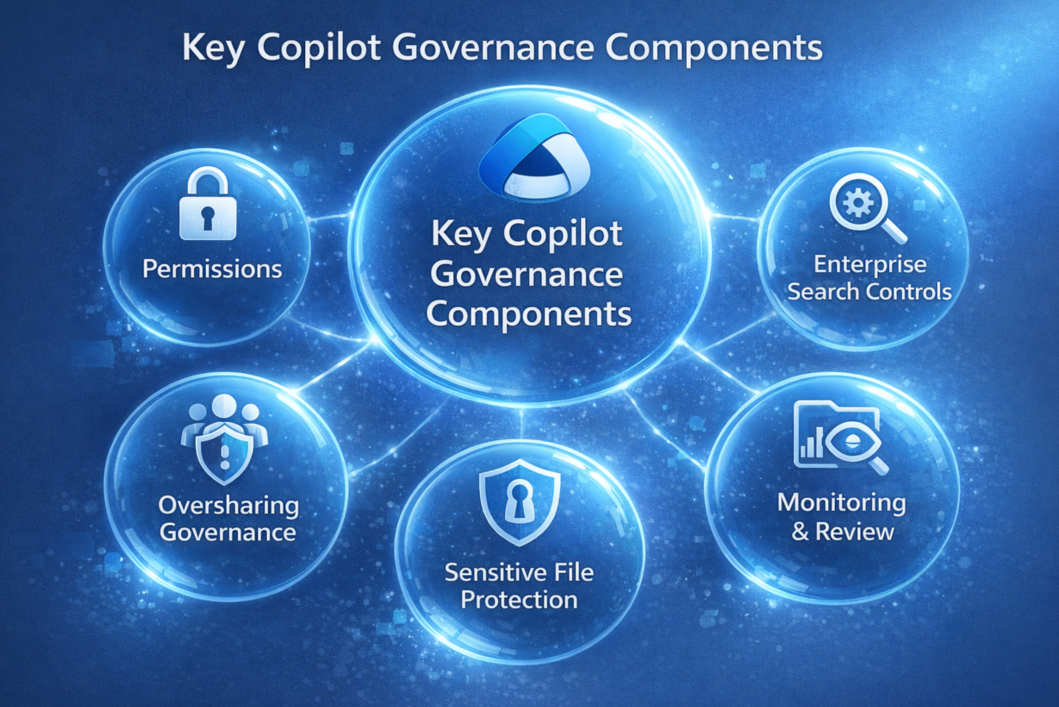
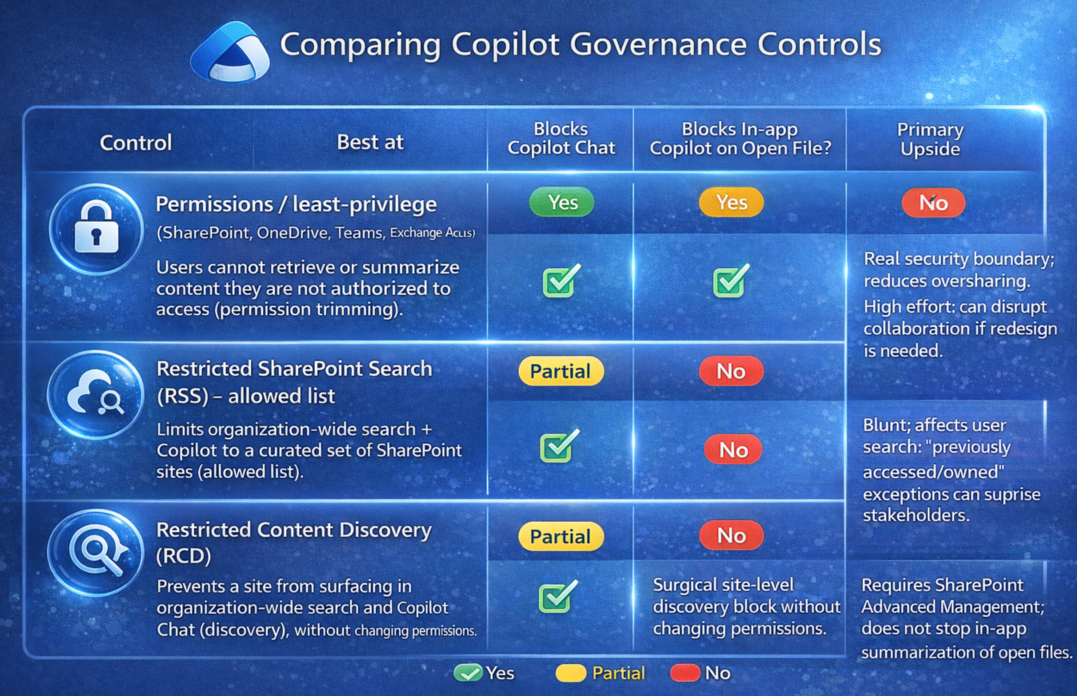
How LegaSystems can help reduce and resolve the risk
|
Control path |
Resolution approach |
|
Permissions and least privilege |
Reduce oversharing in SharePoint, OneDrive, Teams, and Exchange so users and AI cannot retrieve content they should not access. |
|
Restricted SharePoint Search |
Limit organization-wide search and Copilot retrieval to a curated pilot boundary while broader remediation is underway. |
|
Restricted Content Discovery and search scoping |
Suppress sensitive sites or libraries from broad discovery without immediately redesigning every permission model. |
|
Purview labeling and encryption rights |
Protect sensitive files from easy extraction or summarization by enforcing rights and governance on high-value content classes. |
|
DLP and operating model |
Apply policy, monitoring, exception handling, and periodic access review so Copilot governance becomes sustainable rather than one-time cleanup. |
Suggested offer and deliverables section
- Executive risk summary tailored to Microsoft 365 AI exposure.
- Findings by workload: SharePoint, OneDrive, Teams, Exchange, and any connected repositories or agents.
- Priority remediation plan with quick wins and strategic controls.
- Pilot boundary recommendation for safe Copilot rollout.
- Control roadmap: permissions, search scoping, labels, encryption, DLP, and operating model.
Governance before rollout. Visibility before trust. Control before scale.

Customer service
My account
Newsletter